
Credit Risk Model Validation & Calibration Tool
CredX is a validation and calibration toolkit for IFRS 9 and credit risk models.
Designed for model validation teams, consultants, and external audit professionals.
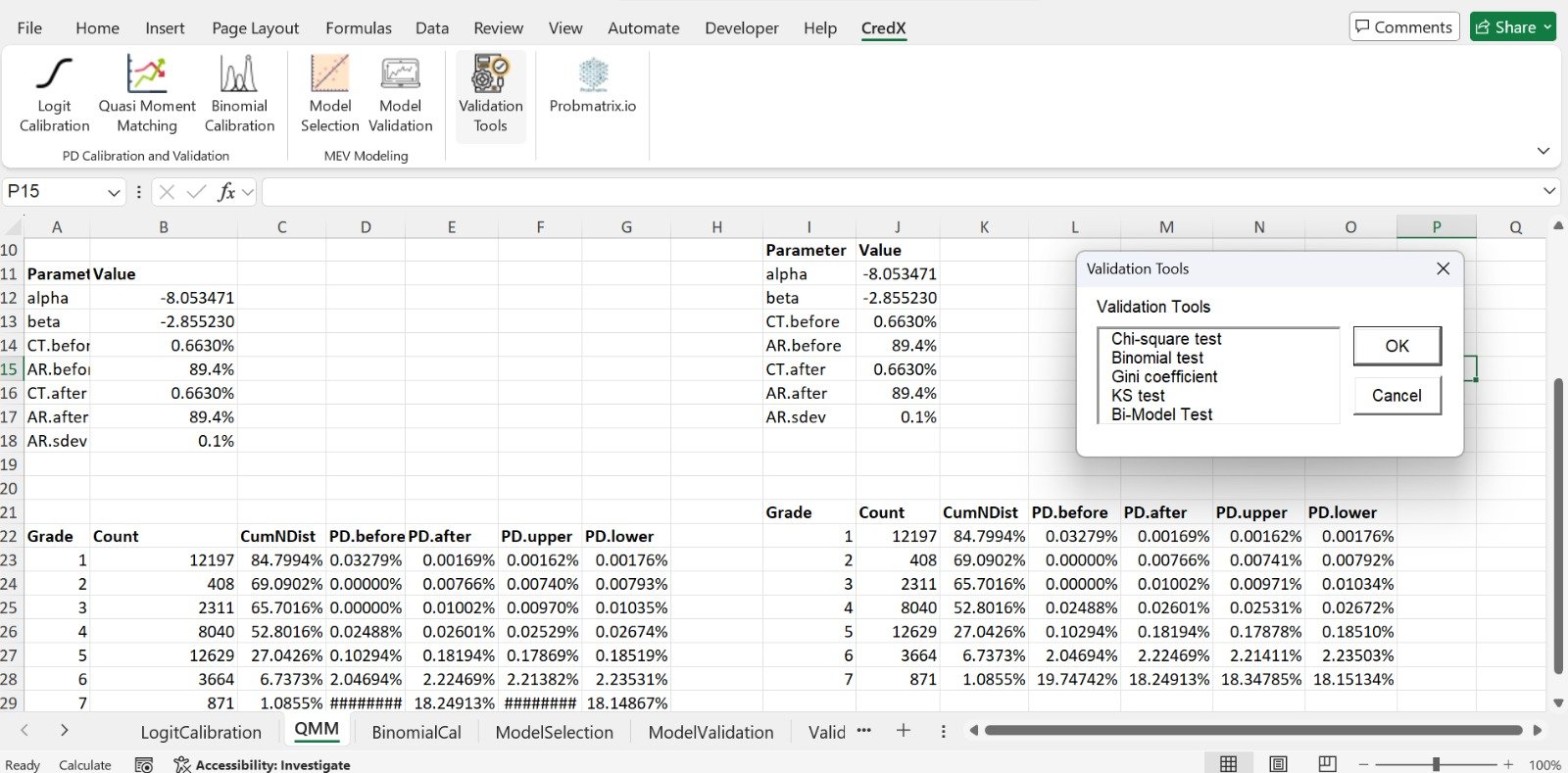
Model Validation Without Spreadsheet Chaos
Credit risk model validation often involves disconnected spreadsheets, manually developed tests, and inconsistent calculations.
CredX provides an environment within Microsoft Excel for validating and calibrating IFRS 9 and credit risk models. It helps users perform model testing more consistently, investigate exceptions, compare model outcomes, and generate evidence that can support validation, governance, and audit procedures.
…and large enterprise model-risk platforms — combining the familiarity of Excel with a structured credit risk validation framework.
Who CredX Is For
Individual Credit Risk Professionals
CredX helps individual professionals perform model calibration and validation without developing every calculation, formula, test, and output format manually.
Suitable forModel Validation Teams
CredX enables validation teams to apply a more consistent testing framework across models, portfolios, segments, and reporting periods.
Suitable forConsultants and Advisory Firms
CredX allows consultants to perform structured calibration and validation procedures across client engagements without rebuilding the testing framework for every assignment.
Suitable forExternal Auditors
CredX can support audit procedures over selected IFRS 9 and credit risk model components by providing structured analytical and recalculation tools.
Suitable forCredX supports analytical and review procedures but does not replace professional judgement, audit standards, or the auditor's responsibility for determining the nature and extent of audit work.
CredX Tools
Twenty calibration and validation tools across seven categories, covering the full IFRS 9 model lifecycle from PD calibration through PiT LGD validation.
Quasi Moment Matching Calibration
Calibrate rating-grade PDs while maintaining the relative risk differentiation of the original model.
Can support- Alignment with a target portfolio default rate
- Alignment with a target Accuracy ratio
- Preservation of the general risk-ranking structure
- Comparison of original and calibrated PDs
- Assessment of calibration impact across rating grades
Logit Calibration
Adjust PD estimates where scorecards are available, using a logit-based transformation.
Can support- Rating-grade calibration
- Assessment of changes across the PD scale
- Review of calibration consistency
Binomial Calibration
Assess and calibrate PD estimates using the binomial distribution — suited to low default portfolios.
Can support- Comparison of predicted and observed defaults
- Rating-grade calibration
Why Use CredX?
Specialised for Credit Risk Models
CredX is designed around IFRS 9 and credit risk model testing rather than generic statistical analysis.
Excel-Based Interface
Perform calibration and validation within the environment already used by many risk, finance, validation, consulting, and audit teams.
Structured Testing
Apply consistent tests, parameters, and result formats across models and reporting periods.
Transparent Results
Review inputs, assumptions, thresholds, calculations, and results within Excel.
Repeatable Workflows
Repeat the same validation procedures across portfolios, segments, clients, and forecast periods.
Faster Execution
Reduce the time required to build formulas, create calculations, format results, and prepare standard model tests.
Evidence-Oriented Outputs
Use CredX results to support:
- Model validation reports
- Calibration documentation
- Model monitoring reports
- Audit working papers
- Model governance submissions
- Management and committee presentations
- Consultant deliverables
Buying Options
CredX is available under two principal licence options.
CredX Professional
For Individual Professionals
A named-user licence for professionals who perform model calibration, validation, monitoring, or independent review.
Usage allowance- Up to 10 runs per tool per month
- Limited macroeconomic-variable inputs for Macroeconomic Model Selection
- Usage limits reset at the beginning of each monthly billing cycle
- User manual
- Product updates during the active license period
- Standard technical support
- Internal professional use
Includes all 20 CredX calibration and validation tools — see CredX Tools.
Coming soonCredX Team
For Consulting Firms, Audit Firms and Organizational Teams
A multi-user license for organizations and professional firms requiring CredX across internal teams or approved external client assignments.
Usage allowance- Unlimited runs across all included tools
- Unlimited macroeconomic-variable inputs for Macroeconomic Model Selection
- Usage remains subject to applicable fair-use, security, and licence terms
- User training
- Product documentation
- Product updates during the active license period
- Priority technical support
- Optional implementation support
- Optional custom training
- Optional custom validation tools
- Optional organization-specific output templates
Includes all 20 CredX calibration and validation tools — see CredX Tools.
Coming soon| Feature | CredX Professional | CredX Team |
|---|---|---|
| Intended users | Individual professionals | Firms and organizational teams |
| Model runs | Limited (10/month) | Unlimited |
| Excel Add-In access | Included | Included |
| Calibration tools | Included | Included |
| Validation tools | Included | Included |
| Standard documentation | Included | Included |
| Product updates | Included | Included |
| Standard technical support | Included | Included |
| Priority support | Not included | Included |
| Team onboarding | Not included | Included |
| Group training | Not included | Available |
| Custom testing tools | Optional | Available |
| Organization-specific templates | No | Available |
Refund & Cancellation Policy
Details on eligibility windows, subscriptions, renewals, and how to request a refund.
How CredX Works
Select the Required Tool
Choose the relevant calibration or validation test from the CredX Excel interface.
Select the Input Data
Provide the required Excel ranges for model estimates, observed outcomes, forecast values, or macroeconomic variables.
Configure the Analysis
Define the required parameters, thresholds, confidence levels, forecast periods, or correlation assumptions.
Run the Test
CredX performs the selected calculations using the configured inputs.
Review the Results
Examine statistical results, movements, exceptions, sensitivities, and test conclusions.
Use the Output
Use the structured results as supporting evidence for calibration, validation, monitoring, consulting, audit, or governance documentation.
CredX Use Cases
Independent Model Validation
Perform a structured assessment before model approval, implementation, redevelopment, or material change.
Periodic Model Monitoring
Track model performance and stability over time using consistent tests and thresholds.
Model Calibration
Adjust model outputs while retaining clear pre-calibration and post-calibration evidence.
Audit Review
Test selected assumptions, inputs, calculations, controls, and outputs as part of IFRS 9 audit procedures.
Regulatory or Governance Review
Prepare evidence for model committees, audit committees, internal governance functions, and regulatory review.
Consulting Engagements
Apply a repeatable validation framework across client assignments while maintaining separate engagement files and outputs.
Challenger Analysis
Compare existing model results with alternative assumptions, calibration approaches, or validation benchmarks.
Frequently Asked Questions
CredX is primarily designed for the validation, calibration, testing, and monitoring of IFRS 9 and credit risk models. It can complement an existing IFRS 9 calculation process by independently testing model components and outcomes.
No. CredX can be used by banks, leasing companies, Modarabas, microfinance institutions, development finance institutions, consulting firms, audit firms, and other organizations that develop, validate, review, or audit credit risk models.
Yes, where the purchased Consultant & Team licence includes authorised external client-use rights.
Yes. CredX can support selected analytical, recalculation, and model-review procedures. The auditor remains responsible for determining the appropriate audit procedures and conclusions.
No. CredX provides analytical and decision-support functionality. Model conclusions, validation opinions, audit judgements, accounting conclusions, and regulatory interpretations remain the responsibility of appropriately qualified professionals.
No software can independently guarantee compliance. CredX supports structured testing and documentation, but compliance depends on the institution's methodology, data, assumptions, governance, implementation, and professional judgement.
Yes. Team, Advisory & Audit, and Enterprise buying options may be configured according to the required validation and calibration modules.
Yes. CredX is designed as a Microsoft Excel Add-In.
Yes. CredX Consultant & Team pricing can be structured according to the required number of users.
CredX is an Excel Add-In where the UI runs in Excel and the models run on the Enterprise Engine. Deployment options may include installation within the user's approved environment or controlled access through a supported virtual-desktop arrangement, depending on the selected licence.
Yes. Product onboarding, technical training, and certification options can be provided separately or included within selected packages.
Pricing depends on the selected modules, number of users, internal or external use, client engagements, deployment requirements, support level, and customisation.
Custom tests, output formats, thresholds, and organisation-specific requirements may be considered under the Consultant & Team option.
Ready to Validate with Confidence?
Talk to the team about which CredX licence fits your validation, calibration, or audit workflow.